# microSAMPLER Editor / Librarian
Web page: https://benjamindehli.github.io/microsampler-editor-librarian/
A modern editor & librarian for the Korg microSAMPLER. Sample editing, effects, patterns and full bank backup, from your computer.
[Download the apps →](https://benjamindehli.github.io/microsampler-editor-librarian/getting-started#download) [Download v1.19.0 (ZIP) →](https://github.com/benjamindehli/microsampler-editor-librarian/releases/download/v1.19.0/microsampler-editor-librarian-v1.19.0.zip) [View on GitHub →](https://github.com/benjamindehli/microsampler-editor-librarian)
## What it is
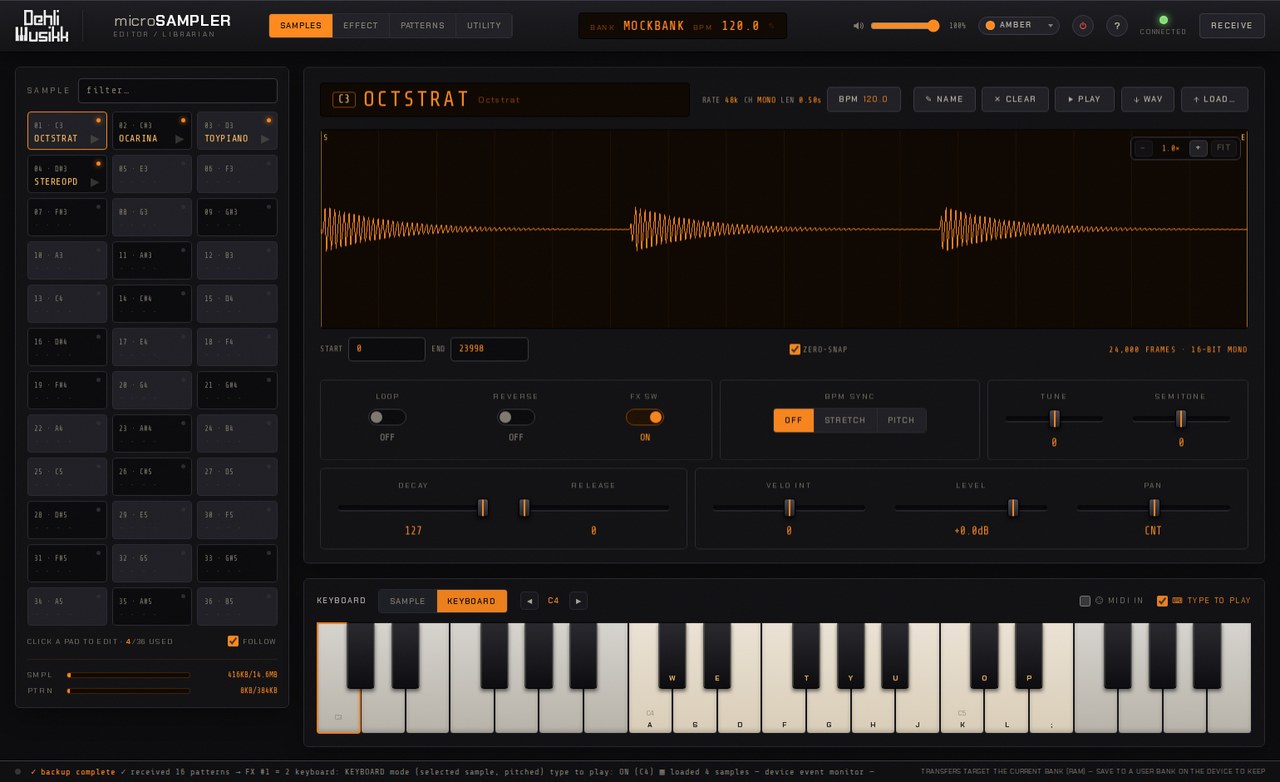
The **microSAMPLER Editor / Librarian** lets you edit and manage your Korg microSAMPLER from a modern computer. It replaces Korg's original application, which is 32-bit and won't run on macOS 10.15 or later. It talks to the hardware over USB and gives you a full graphical editor in your browser: the interface is plain web files served by a small local helper (the "bridge"), so there's nothing to build. Get it as a [signed desktop app](https://benjamindehli.github.io/microsampler-editor-librarian/getting-started#download) for macOS (plus the Library app as a Linux AppImage), or as a small ZIP whose only requirement is Python 3.
What you can do:
- **Samples**: download/upload WAVs, edit every parameter, trim on the waveform, audition on the device, and manage all 36 slots.
- **Effect**: edit all 22 effect types with their complete parameter sets, with hardware-knob tracking and presets.
- **Patterns**: receive, play and record patterns on the device, edit them in a built-in piano roll, and import/export them as MIDI files.
- **Librarian**: back up and restore entire banks (including the device's persistent user banks), and, with no hardware connected, browse and export samples and patterns from backups, including Korg's `.msmpl_bank` files.
- **Play it**: an on-screen and computer-keyboard piano, live MIDI-controller input (velocity, pitch bend, sustain, channel routing), MIDI Learn for the sample controls, and Loop Hold to keep loops playing.
> **UNOFFICIAL PROJECT**
>
> This is an independent project, **not affiliated with, endorsed or supported by Korg**. It contains no Korg software or firmware. *microSAMPLER* and *Korg* are trademarks of Korg Inc., used only to identify the hardware this software works with.
## Explore the docs
### [Getting started →](https://benjamindehli.github.io/microsampler-editor-librarian/getting-started)
Requirements, install on macOS / Linux / Windows, first run, and the device setup you need.
### [The guide →](https://benjamindehli.github.io/microsampler-editor-librarian/guide)
A detailed guide to every view: Samples, Effect, Patterns & the editor, Utility, Library, keyboard & shortcuts.
### [How it works →](https://benjamindehli.github.io/microsampler-editor-librarian/concepts)
The microSAMPLER's banks, memory, sample vs keyboard mode, BPM-sync, effects and the sequencer.
### [Troubleshooting & FAQ →](https://benjamindehli.github.io/microsampler-editor-librarian/troubleshooting)
Connection issues, the MIDI-clock setting, persistence, and answers to common questions.
## Free & open source
Made by **Benjamin Dehli / Dehli Musikk** and licensed under the [GNU GPL v3](https://www.gnu.org/licenses/gpl-3.0.html). The communication protocol was independently reverse-engineered for the sole purpose of interoperability with hardware owned by the user. The source is on [GitHub](https://github.com/benjamindehli/microsampler-editor-librarian). The [releases page](https://github.com/benjamindehli/microsampler-editor-librarian/releases) contains every release and its changelog.