
Overtonium / Controls
Controls
Thirty-two channel strips, a noise channel, and a bar of global controls across the top. Every strip carries the same twenty-three controls, which is seven hundred and thirty-six of them before the bar is counted, so a good deal of the design is about not having to move them one at a time.
This page is the mixer. The bar across the top, from the oscillator character to the output stage, is on Effects, and playing the instrument from a keyboard, a host or a controller is on Playing.
A channel strip
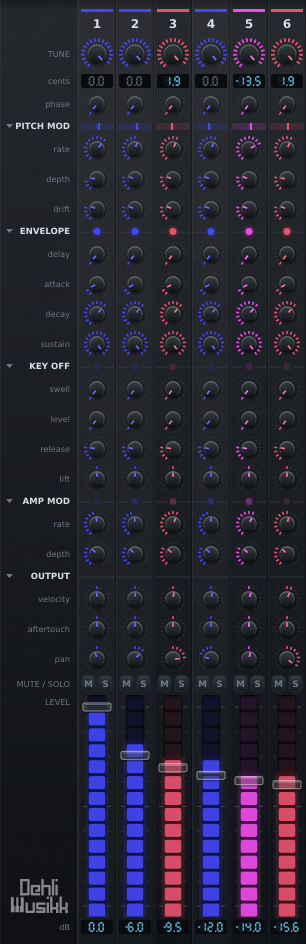
| Control | Range | What it does |
|---|---|---|
| TUNE | equal to just | Where this partial sits between the tempered position and the exact ratio. The readout shows the resulting cent offset. On the six octave channels both tunings agree, so there is nothing for it to move and the strip says so |
| PITCH MOD shape, rate, depth | Eight shapes, 0.01 to 30 Hz, 0 to 1200 cents | Per-partial vibrato |
| DRIFT | 0 to 25 cents | Smooth random pitch wander, its own stream per partial |
| GLIDE | Off to 5 s | How long this partial takes to reach a new note, so the series can arrive a partial at a time. Whether it glides always or only legato, and at a fixed rate or in a fixed time, is on the L and T switches beside the caption and in the knob's right-click menu: see Glide |
| ENVELOPE strike, delay, A, D, S | -100 to +100%, 0 to 5 s, 90° then 0.2 ms to 5 s, 1 ms to 20 s, 0 to 100% | Exponential decay. STRIKE starts the partial sooner and faster the harder the key is struck |
| KEY OFF swell, level, release | 0 to 5 s, 0 to 100%, 1 ms to 20 s | A second envelope for letting go |
| AMP MOD shape, rate, depth | Seven shapes, 0.01 to 30 Hz, 0 to 100% | Per-partial tremolo |
| VELOCITY | -100 to +100% | How much key velocity scales this partial. Negative inverts it |
| AFTERTOUCH | -100 to +100% | How much key pressure moves this partial. Negative fades it out |
| PAN | hard left to hard right | Equal power, so the level holds as the partial crosses the field |
| M and S | Mute wins over solo. Right-click either one to clear every mute or every solo at once | |
| LEVEL | -inf to 0 dB | Fader spaced by decibels, with the meter filling its track |
What the modulators trace
Both per-partial modulators have a shape as well as a rate and a depth, picked from a small drawing of the wave between the two knobs. Click it for the list by name. Pitch offers eight, amplitude seven, and each channel has its own, the noise channel included, which is the point: the fifth partial can be gated while the fourth breathes.
| Shape | What it does |
|---|---|
| Sine | The default, and what both modulators were before there was a choice |
| Triangle | The same travel at an even speed, which reads as more mechanical than a sine |
| Sawtooth, Reverse Sawtooth | A ramp and a snap back, either way round |
| Square | Two values and nothing in between. On pitch it is a trill, and comes in a bipolar form that goes the same distance either side of the note and a unipolar one that only ever goes up |
| Sample & Hold | A new random value each cycle, held until the next. On pitch, with the depth wide open, that is a run of random notes anywhere within an octave either side |
| Random | The same values, glided between rather than stepped. The contour DRIFT traces, under your own rate |
Amplitude has one square, not two. A tremolo only ever comes down from the fader, so there is no second direction for a unipolar shape to go in and the one square gates the whole depth. For the same reason every shape on that side is read a quarter turn ahead: a note begins at full level and dips, rather than starting half attenuated.
The square and stepped shapes do not click. The gain a partial is given already slides across each control block rather than jumping, so an edge arrives as a slew of about two thirds of a millisecond, which is short enough to read as an edge and long enough not to be heard as a tick.
LINK does not reach these. It drags a value across the series along a weighted curve and there is no weighting a list of named shapes, so the shape menu offers to set every channel at once instead.
Shared by all notes is the other entry in that menu, one for each of the two modulators, and it is also the switch beside each SHAPE caption on the left of the mixer, the one marked with three strokes merging into one. A modulator belongs to a note by default, so striking a chord a note at a time gives you three tremolos that each started where their own key did and breathe out of step. Ticked, the modulator belongs to the channel instead and a note arriving late joins whatever is already running, so a chord breathes as one thing however it was played. That is what an instrument with one tremolo circuit in it does, which is why Wurli ships with its tremolo shared and StyloPoly with its vibrato.
Each channel keeps its own rate and shape either way. What is shared is one circuit per channel rather than one for the instrument, so a patch built on thirty-two rates that never line up still sounds like itself with the switch on. It is part of the patch, so a preset carries it, and both switches are off in anything that does not ask.
The switch lights when its modulator is shared, so a preset that arrives with a shared tremolo says so on the panel rather than only in the menu. One switch per modulator, since all thirty-three channels answer to it.
Velocity and pressure, per partial
Velocity being per partial is what lets a soft note be a different timbre rather than just a quieter one. Set the fundamental to 0% and the upper partials to 100% and the tone opens up as you play harder, which is roughly what a struck string or bar does.
Both controls run either side of zero. A positive amount means harder or heavier is louder. A negative amount inverts that, so the partial is at its loudest when you play softly. The two halves are exact mirrors, so -50% at a given velocity matches +50% at the opposite velocity. The reason to want the negative half is crossfading: give one set of partials a positive amount and another set a negative one, and the two timbres trade places across the velocity range instead of one simply fading in.
Aftertouch works the same way but adds to the fader instead of scaling it, and it ignores velocity entirely. A strip with its fader all the way down is silent until you lean on the key, and then it fades in under your finger, while a negative amount fades an open strip back out. Both channel pressure and polyphonic aftertouch are accepted and whichever is higher wins. Pressure is smoothed over about 15 ms, so seven-bit MIDI does not step the gain.
The mod wheel stands in for it by default, since most keyboards have no aftertouch at all and the wheel is the control your hand already goes to. A wheel left alone reads zero, so nothing changes for a controller that does send pressure. Settings has an "Aftertouch from" entry if you would rather have one or the other on its own.
The two-part envelope
Delay, attack, decay and sustain on the way in. Letting go of a key then runs its own little envelope rather than simply fading out: the KEY OFF rows say where the level goes when the key is released and how long it takes to get there, and only then does the release run from that level down to silence.
Above the sustain that is a release click or a bloom, the sound a damper landing or a hammer returning makes, and it can be louder than the note was while you were holding it. Drawbar Organ uses it that way: the upper drawbars jump to 55% for two milliseconds as the contacts break. Below the sustain it is the fast initial drop into a long tail that a piano or a struck bell actually has, which is probably the half that gets more use. A key-off level of zero skips the stage entirely and releases from wherever the level sat.
How fast you let the key up scales that tail, on a keyboard that can sense a release. The hardest lift leaves twice the level, the softest half of it and 64 is neutral, and it scales the level the tail would have started from, so on a patch with a key-off level of its own it moves that and on a patch without one it moves the sustain. There is no knob for it and no parameter: it belongs to the gesture rather than to the patch, the way velocity does. A partial already sounding at full has nowhere for a hard lift to go, since the envelope stops at full scale.
Most keyboards cannot sense a release at all, and on those nothing changes. They say so in two different ways, either a note-off carrying zero or a note-on of velocity zero standing in for one, and both are read as no information rather than as the softest lift there is.
The delay stage holds a partial silent before its attack begins. Staggering it across the series makes the spectrum unfold rather than arrive all at once, which is how Slow Pad and Shimmer open up. It is latched in samples at note-on, so moving the knob cannot retime a note already waiting.
ATTACK reaches below its shortest time. Turned past 0.2 ms it stops being a time and becomes where in its cycle the partial starts, from 0°, a rising zero crossing, down to 90° at the bottom of the knob, which starts the partial on its own peak with no attack at all. A zero crossing is the softest onset there is: a partial cannot reach its peak until a quarter of its period has gone by, and below about 500 Hz that is longer than the shortest attack, so on most of the keyboard the edge of a note is set by where its cycle starts rather than by the envelope. A millisecond into an A1, a partial starting from the crossing is a third of the way up, from 45° nine tenths, and from the peak all of it. On the ring that stretch is drawn as dots rather than ticks, so a knob in degrees and a knob in milliseconds can be told apart at a glance.
It is per channel like every row, so the edge can go on some partials and not others, and LINK spreads it across the series in one drag. Every partial on its peak at once is a spike: for 32 partials on a falling series the first sample is about four times the steady peak, and the output stage meets it. Staggering the start across the channels keeps the edge and loses the spike. With phase reset off in Settings a partial carries on from wherever its cycle was, and this stretch of the knob is the shortest attack.
STRIKE sits at the head of the section because it is about the blow rather than about the shape, and it aims that blow at the two rows under it, the way the velocity row aims it at the fader. Zero ignores the gesture. Positive means a hard note starts sooner and arrives faster, and a soft one waits and then opens slowly. Negative inverts it.
The two halves lean opposite ways on purpose, and each knob stays the limit of its own row. Velocity only ever lengthens the attack, so ATTACK goes on meaning the fastest the partial gets, and it only ever pulls the delay in, so DELAY goes on meaning the latest it arrives. Both span eight octaves at full amount, a range of 256 to 1: a partial set to 2 ms attacks in 2 ms under a hard blow and takes half a second under the softest, and a 400 ms delay stays 400 ms under the softest and comes in to under two milliseconds under the hardest. The stretched attack stops at five seconds, which is as long as the ATTACK row itself goes. It moves the whole of the row, the stretch below the shortest time included: a partial set to start on its peak starts there under a hard blow, nearer the zero crossing under a lighter one, and past it into a short attack under the softest. A quarter turn is worth two octaves of attack, so at full amount the softest note takes that peak to about 13 ms.
Setting it per partial is what separates it from a velocity curve over the whole instrument: give the upper partials a strike amount and leave the fundamental at zero, and a hard chord lands as one bright block while a soft one unfolds, the fundamental first and the series arriving behind it.
One shape worth knowing, because it is what a music box or a thumb piano has: no sustain at all, so the partial decays to silence while the key is still down, and then a key-off level that brings it back. Reaching zero is not the same as being finished.
Ganging the channels
One button at the top of the caption column on the left chooses what a drag in the mixer does, and it is the one control that is not on the top bar. It wears the pointer you are about to be holding rather than a word: a plain arrow, an arrow with two chain links, or an arrow with a drawn contour. Clicking it names the three, and a right-click anywhere in the mixer opens the same menu, which is where you are when you want it.
Link gangs the strips: dragging any knob moves the same knob on the others. It works relatively, applying an offset to wherever each strip already sits rather than dragging everything to one shared value, so a spectrum you have shaped by hand keeps its shape. The offset is always measured from the values captured when the drag started, so returning the knob to where you began restores the strips exactly, even if some of them hit an end stop along the way.
Which channels a drag reaches and how it is shared out are set in the same menu, under the three tools, so the tool and its settings are one click apart. With Link chosen, pointing at a knob arms every knob a drag from it would move, before you touch anything, and how brightly each one lights follows the curve.
Draw is the third. A drag across the faders sets each channel it passes over from the pointer's height, so a spectrum can be drawn in one stroke rather than one fader at a time. Holding shift does the same for as long as it is held, whatever tool is chosen, and the button shows the contour for as long as the key is down, so the panel says what a drag would do however it came to be that way.
They are one choice rather than three switches because a drag cannot be two of them at once. When they were two separate switches, LINK had to be shown as off while drawing was armed without actually being off, which is a lie the mouse-up would have exposed.
It is not Link under another name: Link shares one relative move out across the channels by a rule, and drawing sets absolute values freehand, so neither can do the other's job. Columns the pointer crosses between one moment and the next are filled in, so a fast hand leaves no gaps, and the whole stroke is a single undo. It works on the faders alone, because a fader's value is where it stands and a pointer's height means nothing to a knob.
While it is armed every fader lights, in the same accent the button is lit in, so what the next drag would reach is visible before you touch anything. That is the same preview LINK uses, since both answer the one question. The pointer becomes a pencil and LINK reads as off, without being off: only one of the two can be what the next drag does, and letting go gives LINK back.
| Scope | Reaches |
|---|---|
| All | every partial |
| Same interval | only the strips sharing the interval class of the one you grab, so you can move just the fifths, or just the octaves |
| Odd harmonics | 1, 3, 5 and so on, the hollow half of the series |
| Even harmonics | 2, 4, 6 and so on |
| Curve | How the drag is shared out |
|---|---|
| Uniform | every selected strip moves by the same amount |
| Taper from the grab | a strip moves less the further along the series it sits from the one you grabbed |
| Spread / gather | pushing up scatters the strips apart along random directions, pulling down gathers them onto the strip you are dragging |
Taper is anchored on the strip you grabbed, which always gets exactly its full share of the drag. That has to be true, since the knob under the mouse follows the mouse. From there a strip's share falls off in a straight line with distance, reaching nothing thirty-one channels away.
Where you reach in is therefore the whole control. Grab channel 1 and the mixer tilts down across its full width, from everything to nothing. Grab channel 32 and it tilts up instead. Grab channel 10 and the curve peaks under your hand and falls away on both sides, to 0.71 at channel 1 and 0.29 at channel 32. Distance is measured against the full width rather than against whichever end is nearer, so the reach stays the same wherever you grab: scaling it to the nearer end would make a grab on channel 2 drop channel 1 to nothing in a single step.
LINK gangs the 32 partials only. The noise channel has no tuning, pitch modulation or drift to gang.
Working the panel
Double-clicking a knob restores its default, which is that control's own default rather than the bottom of its range. On a fader that is 0 dB rather than silence.
Undo and redo matter here more than they would on a smaller instrument, because one LINK drag moves the same knob on all 32 channels and without a history the only way back is to reload the preset. A step is a gesture rather than a value change, so that drag comes back in one rather than thirty-two. Cmd-Z and Cmd-Shift-Z, or Ctrl with the same two keys away from a Mac, work where the host lets them through, which many do not, since a DAW usually keeps those for its own history. Both are also in the Settings menu, just under the version, which always works. Loading a session starts you with an empty history rather than with whatever the last person did.
Resting on a strip names the partial it belongs to: the harmonic number, the interval that harmonic makes with the fundamental, how many semitones above the played note the tempered position is, and how far the exact ratio sits from that in cents. It is the row that channel has in the table of the series, without leaving the mixer. The mute and solo buttons say which harmonic they would silence.
Right-clicking anywhere in the mixer opens the LINK menu, which is where your hand already is when you want it. The mute and solo buttons take the click instead and clear every mute or every solo at once.
Reading the mixer
The two readouts
Each channel carries two figures, the cents its tuning knob is worth and the level its fader is at, both drawn as seven-segment displays rather than as text: a number the instrument is reporting back should look different from a number you typed. Two of the things they show are not numbers. A partial left in equal temperament reads Et and a fader all the way down reads -inF, both dimmed, because a statement of fact is not a level. The fundamental and the octaves read a dimmed 0.0, since their just interval is the note itself.
Lamps on the rules
The rules dividing a strip into groups carry a lamp each, showing what the group under them is doing to this partial right now.
| Rule | Shows |
|---|---|
| PITCH MOD | a needle on a track, flat to the left and sharp to the right, where modulation, drift and a glide still on its way have the partial now |
| ENVELOPE | how far up its envelope the partial is, while the key is down |
| KEY OFF | the same, once the key is up and the key-off stage has taken over |
| AMP MOD | how far the tremolo has pulled the level down, so it pulses at the rate and swings further at greater depth |
| OUTPUT | two lamps side by side, one for each row beneath it: the left is what the blow has left of the partial, the right is what the pressure on the key is adding |
They read from the voice pool rather than from the knobs, so they describe a note rather than a setting and nothing pulses over silence, and they follow the loudest voice on that partial, which is the one the meter follows. The output rule carries two of them, one for each row beneath it, and each is the shape of the knob above it. VELOCITY can only take level away, so its lamp shows what the row has left: full when the blow has cost the partial nothing, dark when the row has taken all of it, and full at every velocity when the knob sits at the centre. AFTERTOUCH adds instead, so its lamp rests dark and comes up as you lean on the key, and it does not matter which way that row is set to push. The needle's scale is fixed and the same on every strip, so two channels can be compared by eye. Full deflection is 225 cents, which is a vibrato and a drift at full stretch rather than the widest the depth knob now reaches. A square set to jump an octave pegs it, and so does a wide glide until it is within a couple of semitones of its note, which is the honest thing for a needle to do when it is off the end of its scale: scaled to the octave instead, an ordinary vibrato would not move it at all.
Meters
Each channel meters what that partial is actually putting out, on a decibel scale floored at -48 dB, so the envelope, tremolo, velocity, aftertouch and mute or solo all show at once and the spectrum can be watched evolving as a note decays. The meter fills the fader's own track rather than sitting beside it, and the cap is drawn as translucent glass so the meter reads through it. It reads the loudest instance of a partial across the sounding voices rather than the sum, so it shows the shape of the patch instead of pinning itself the moment you play a chord.
Colour and hover
Channels are coloured by interval class, in chromatic order along a narrow band from blue at the octave, through magenta and red, to yellow at the major seventh, so octaves, fifths and thirds stay visible while you scroll. The band is deliberately narrow so 32 channels read as one family rather than a rainbow, and nothing in it enters the green and cyan the global controls use. Pointing at a knob picks out its row all the way across the mixer and brackets the channel it is on, so where the two cross is the control a drag would move.
Folding the mixer down
Clicking a section heading in the caption gutter folds that group of rows away across every channel at once, and so does clicking the rule that section draws across any strip, which saves crossing to the gutter and finding your way back to the partial you were working on. Pointing at a rule gives the same hand a heading does and lights that section's caption and its disclosure mark, so what the click would fold is visible before you make it. The window loses exactly the height those rows were taking. Pitch modulation, envelope, key off, amp mod and output each fold. The tuning at the top and the faders at the bottom always stay. The heading keeps its activity lamp while folded, so a group you cannot see still reports whether it is doing anything, and the fold state is remembered with the session rather than with the patch.
The noise channel
Pinned on the right, after the series it does not belong to, is a noise channel marked NZ. It has the same envelope, tremolo, velocity, aftertouch, pan, mute, solo, level and meter as a partial, and takes part in solo alongside them. What it does not have is pitch, so the tuning, pitch modulation and drift rows are empty.
COLOUR takes the tuning row instead, tilting the noise from dark rumble at one end, through flat in the middle, to bright hiss at the other. The middle really is flat rather than merely filtered less. Each voice runs its own noise stream, so playing a chord does not layer eight copies of the identical signal.